


Blog
How to Solve Siemens HMI Touch Panel Integration Challenges?

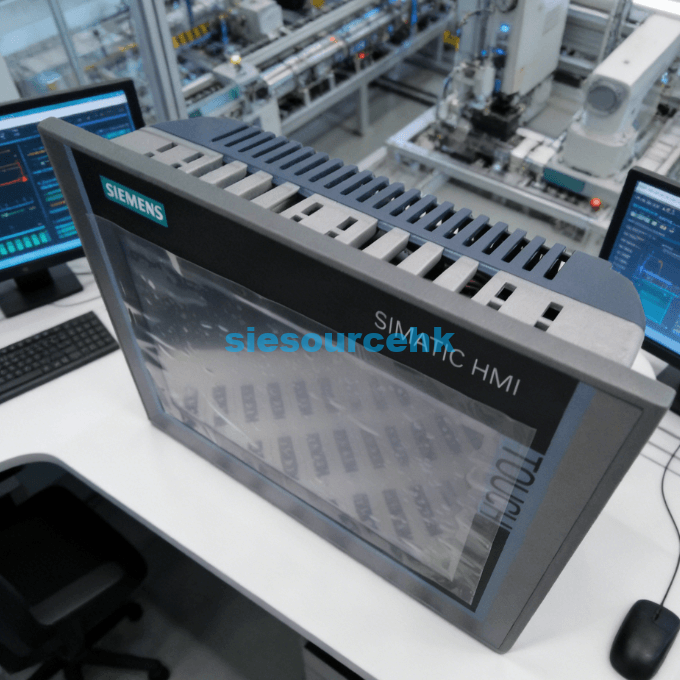
Industrial facilities often encounter significant hurdles when trying to modernize their legacy control systems with a new Siemens HMI Touch. These challenges usually range from communication protocol mismatches to slow screen refresh rates during critical manufacturing operations. A high-performance siemens hmi touch panel is essential for maintaining a clear window into your automated processes without experiencing dangerous system lags. Selecting the correct Siemens HMI touch panel resolves these technical bottlenecks while ensuring long-term hardware compatibility.
The demand for high-resolution data visualization has made the modern siemens hmi touch screen a standard requirement for competitive B2B manufacturing plants. Operators require intuitive interfaces that provide real-time diagnostic feedback to prevent costly machine downtime. Most technical issues arise from poor hardware selection or incorrect environmental protection ratings for specific factory floor conditions. A well-integrated Siemens HMI touch screen simplifies complex data and empowers your workforce to make faster decisions.
Implementing a reliable siemens hmi touch panel requires a deep understanding of both software synchronization and physical durability standards. Modern units like the 6AV2124-0GC01-0AX0-2 offer sophisticated tools to bridge the gap between human operators and programmable logic controllers. These devices reduce the cognitive load on staff by organizing critical alarms and process variables into structured graphical displays. Your choice of a Siemens HMI touch panel directly impacts the overall safety and efficiency of your production line.
Resolving Communication Bottlenecks in Automation Networks
One of the most persistent problems in industrial automation is ensuring a stable connection between the siemens hmi touch panel and various PLCs. Many engineers struggle with data packet loss or slow response times when multiple devices compete for bandwidth on a single network. Utilizing a siemens hmi touch screen with integrated PROFINET switches helps manage traffic and ensures that critical control signals always take priority. Resolving these communication failures is vital for maintaining the high-speed synchronization required in modern robotic assembly lines.
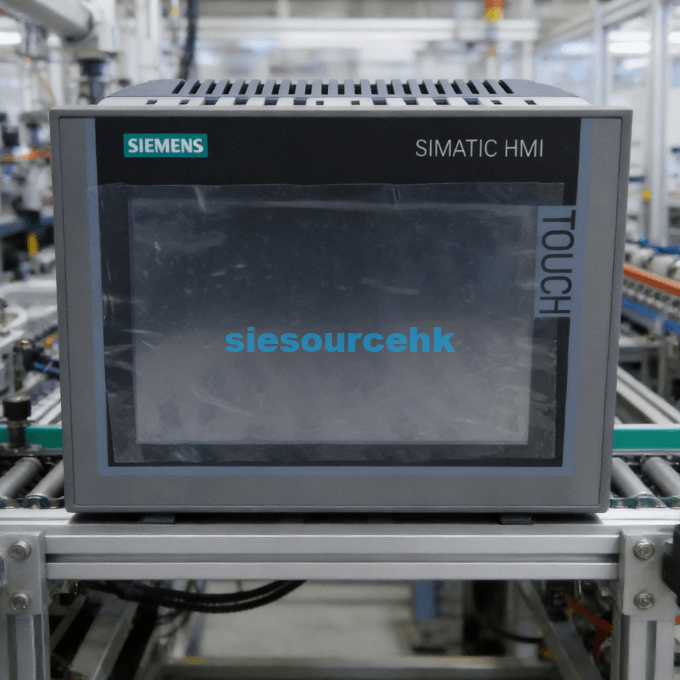
Optimizing High-Speed Data Exchange with PROFINET
To achieve seamless data flow, the siemens hmi touch screen must be configured to handle prioritized industrial ethernet traffic effectively. This model supports standard communication profiles that allow it to talk to both Siemens and third-party controllers without requiring expensive signal converters. Engineers often use these panels to aggregate data from multiple sensors into a single, unified monitoring dashboard for the plant manager. Reliable data exchange through a Siemens HMI touch screen prevents control errors and improves system-wide transparency.
Maintaining Legacy System Support with PROFIBUS
Many factories still rely on older hardware that requires a siemens hmi touch panel with dedicated PROFIBUS or MPI interface ports. The 6AV2124-0GC01-0AX0-2 addresses this need by providing a multi-protocol gateway that connects modern visualization software with legacy machine components. This dual-interface capability allows companies to upgrade their user interfaces without replacing their entire existing infrastructure at once. Supporting legacy protocols with a Siemens HMI touch panel protects your past investments while enabling modern digital features.
- Support for MPI and PROFIBUS DP protocols.
- Simultaneous connection to multiple network types.
- Backward compatibility with older SIMATIC controller generations.
Enhancing Visual Clarity for Critical Process Monitoring
Poor screen visibility in bright or dusty environments is a frequent complaint from operators using a standard siemens hmi touch screen. If the display is too dim or lacks sufficient contrast, staff may miss critical alarms or misinterpret trending data during a shift. High-quality siemens hmi touch panel models feature dimmable LED backlighting and wide viewing angles to ensure readability from any position on the floor. Improving visual clarity through a Siemens HMI touch panel ensures that your operators can respond accurately to changing conditions.
Managing Complex Graphical Objects and Alarm Logs
The ability of a siemens hmi touch screen to render detailed vector graphics is essential for representing complex piping and instrumentation diagrams. The 6AV2124-0GC01-0AX0-2 supports up to 16 million colors, which allows for highly nuanced status indicators that go beyond simple red or green lights. This level of detail helps operators distinguish between minor warnings and catastrophic system failures before they escalate into major production losses. Detailed graphical rendering on a Siemens HMI touch panel improves the overall diagnostic capability of your technical team.
Reducing Operator Fatigue with Ergonomic Interface Design
A well-designed siemens hmi touch screen interface minimizes the number of clicks required to access essential machine functions. By utilizing the 7-inch widescreen format, designers can place frequently used buttons in accessible locations that match natural hand movements. This ergonomic approach reduces the physical and mental strain on operators who must monitor these screens for eight or more hours daily. Ergonomic design in a Siemens HMI touch panel leads to higher job satisfaction and fewer human errors during operation.
- Widescreen format provides 40% more usable display area.
- High-contrast TFT displays minimize eye strain in low-light areas.
- Customizable brightness levels suit both indoor and outdoor installations.
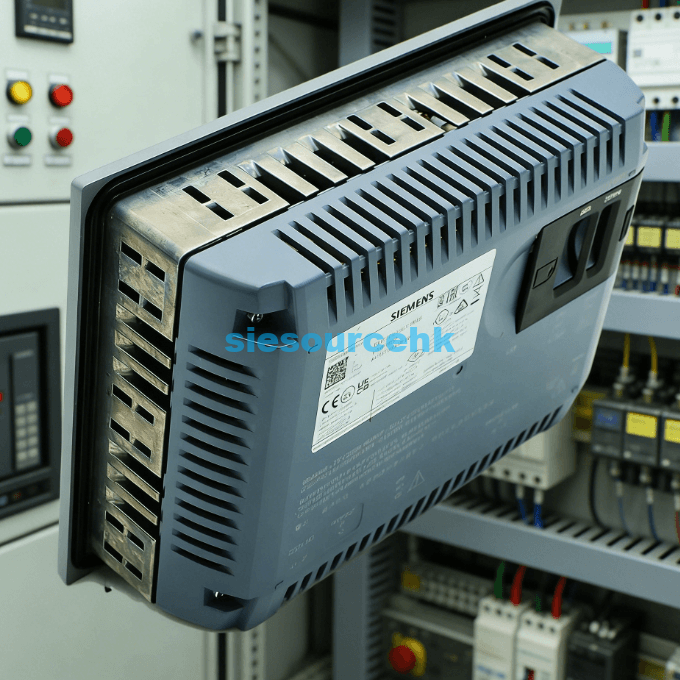
Protecting Interface Hardware in Extreme Environments
Physical damage from chemicals, moisture, or high temperatures is a leading cause of failure for a siemens hmi touch panel in heavy industry. Without proper ingress protection, fine dust particles can penetrate the housing and cause short circuits in the sensitive internal electronic components. Rugged siemens hmi touch screen models are designed with specialized seals that meet IP65 standards to prevent such environmental damage. Choosing a Siemens HMI touch panel with high environmental resistance ensures continuous operation in the most demanding settings.
Implementing Efficient Heat Dissipation Strategies
Thermal management is a critical factor for any siemens hmi touch panel installed inside a crowded or unventilated electrical control cabinet. High ambient temperatures can cause processors to throttle their speed or even shut down to protect the hardware from permanent heat damage. The 6AV2124-0GC01-0AX0-2 utilizes a fanless cooling design that relies on efficient heat sinks to maintain a safe operating temperature. Effective heat dissipation in a Siemens HMI touch screen prevents performance degradation during the peak heat of summer months.
Safeguarding Against Mechanical Vibration and Shock
Heavy machinery often produces significant vibrations that can loosen internal connectors or crack the glass on a standard siemens hmi touch screen. Siemens engineers these panels to withstand specific G-force ratings, ensuring they remain functional even when mounted directly onto vibrating machine frames. This mechanical durability is essential for applications in mining, construction, and high-speed packaging where constant movement is a standard operational factor. The structural integrity of a Siemens HMI touch panel provides the ruggedness needed for long-term industrial reliability.
Selecting the Right Solution for Your Automation Needs
Navigating the vast array of available hardware to find the perfect siemens hmi touch panel can be an overwhelming task for many B2B procurement managers. You must carefully balance your requirements for screen size, processing power, and communication ports against your specific project budget and timeline. For those seeking a high-performance balance, the Siemens HMI touch panel 6AV2124-0GC01-0AX0-2 offers a robust solution for medium-to-large visualization projects. Making an informed selection of a Siemens HMI touch panel ensures that your automation system remains scalable for years.
Simplifying Maintenance and Global Support Access
Maintenance teams benefit greatly from a siemens hmi touch screen that is backed by a global network of technical support and spare parts. When a panel fails, having access to standardized hardware means that you can quickly swap the unit and restore production without extensive reprogramming. Siemens provides extensive documentation and firmware updates to ensure that your devices stay protected against new cybersecurity threats and software bugs. Choosing a Siemens HMI touch panel ensures that your facility has access to world-class support whenever difficulties arise.
Scaling Your System with Modular Visualization Software
The software running on your siemens hmi touch screen should be flexible enough to handle future expansions as your manufacturing needs grow. By using the TIA Portal framework, you can easily migrate your visualization projects across different screen sizes within the Comfort Panel family. This modularity allows for a consistent user experience regardless of whether the operator is using a small 4-inch screen or a large 22-inch display. Project scalability through a Siemens HMI touch panel protects your engineering effort from becoming obsolete as technology evolves.
Summary
The Siemens HMI touch panel 6AV2124-0GC01-0AX0-2 is the definitive solution for B2B users facing complex integration and visualization challenges. It provides the perfect blend of high-resolution clarity, rugged environmental protection, and diverse communication support for any modern factory. By implementing this siemens hmi touch screen, you ensure a reliable interface that optimizes operator efficiency and minimizes unplanned system downtime.
| 6AV7241-5GC45-2GA0 | 6AV6647-0AD11-3AX0 | 6AV6641-0AA11-0AX0 | 6AV6647-0AD11-3AX0 |
| 6AV6641-0AA11-0AX0 | 6AV7875-0AE50-1BC0 | 6AV3607-1JC20-0AX1 | 6AV7875-0AE50-1BC0 |
| 6AV3607-1JC20-0AX1 | 6AV2123-2GB03-0AX0 | 6AV2124-1DC01-0AX0 | 6AV2123-2GB03-0AX0 |
| 6AV2124-1DC01-0AX0 | 6AV7241-1BA34-0JA0 | 6AV6648-0BC11-3AX0 | 6AV7241-1BA34-0JA0 |
| 6AV6648-0BC11-3AX0 | 6AV7241-3BB07-0DA0 | 6AV6646-1BA15-0NA0 | 6AV7241-3BB07-0DA0 |
| 6AV6646-1BA15-0NA0 | 6AV6647-0AA11-3AX0 | 6AV2181-5AG80-0AX0 | 6AV6647-0AA11-3AX0 |
| 6AV2181-5AG80-0AX0 | 6AV6542-0AC15-2AX0 | 6AV3637-1LL00-0AX1 | 6AV6542-0AC15-2AX0 |
| 6AV3637-1LL00-0AX1 | 6AV6881-0AP40-0AA0 | 6AV6371-1DQ10-0BX0 | 6AV6881-0AP40-0AA0 |
| 6AV6371-1DQ10-0BX0 | 6AV2124-6MJ00-0AX0 | 6AV6371-1CA08-1AX0 | 6AV2124-6MJ00-0AX0 |
| 6AV6371-1CA08-1AX0 | 6AV6647-0AG11-3AX0 | 6AV6381-2BQ08-1AX0 | 6AV6647-0AG11-3AX0 |
| 6AV6381-2BQ08-1AX0 | 6AV6647-0AH11-3AX0 | 6AV3627-1LK00-1AX0 | 6AV6647-0AH11-3AX0 |
| 6AV3627-1LK00-1AX0 | 6AV2123-2JB03-0AX0 | 6AV6648-0DE11-3AX0 | 6AV2123-2JB03-0AX0 |
| 6AV6648-0DE11-3AX0 | 6AV3535-1FA01-1AX1 | 6AV6371-1CA08-0AX0 | 6AV3535-1FA01-1AX1 |
| 6AV6371-1CA08-0AX0 | 6AV2128-3GB06-0AX1 | 6AV6381-2CA08-0AX0 | 6AV2128-3GB06-0AX1 |
| 6AV6381-2CA08-0AX0 | 6AV6648-0EE11-3AX0 | 6AV7240-5DB06-0HA0 | 6AV6648-0EE11-3AX0 |
| 6AV7240-5DB06-0HA0 | 6AV2124-0GC01-0AX0 | 6AV2181-5AF05-0AX0 | 6AV2124-0GC01-0AX0 |
| 6AV2181-5AF05-0AX0 | 6AV7241-5GC45-2GA0 | 6AV2125-2GB03-0AX0 | 6AV2125-2GB03-0AX0 |
FAQ
1. How do I fix a slow response time on my Siemens HMI touch screen?
Slow response times usually stem from excessive network traffic or an overloaded internal processor. You should optimize your tag update cycles and ensure that your PROFINET configuration is not being flooded by non-essential data packets.
2. Can the Siemens HMI touch panel operate in high-temperature environments?
The 6AV2124-0GC01-0AX0-2 is rated for operation in ambient temperatures up to 50 degrees Celsius. For even hotter environments, ensure your control cabinet has active cooling or sufficient ventilation to prevent the device from thermal throttling.
3. What is the benefit of using the 6AV2124-0GC01-0AX0-2 over basic models?
The Comfort series offers significantly higher resolution, more memory, and expanded communication interfaces compared to the Basic series. These features allow for more complex scripts, better graphics, and the ability to act as a system diagnostics hub.
4. Is it possible to back up project data without a computer?
Yes, this siemens hmi touch panel features two SD card slots that allow for automatic system backups and easy data logging. You can simply swap the SD card into a new unit to restore the entire project in minutes.
5. Does the Siemens HMI touch screen support multi-touch gestures?
While primarily designed for high-precision industrial touch, certain models in the higher-end range support advanced gestures for zooming and scrolling. The 6AV2124-0GC01-0AX0-2 focuses on robust, single-touch accuracy which is often safer and more reliable for operators wearing heavy industrial gloves.
Reference Sources
Siemens Industry Online Support – SIMATIC HMI Comfort Panels Operating Instructions
NEMA – Industrial Control and Systems Standards
International Society of Automation – HMI Design and Engineering Principles