


Blog
Omron NS8-TV00B-ECV2 Guide: High-Performance for Industrial Automation

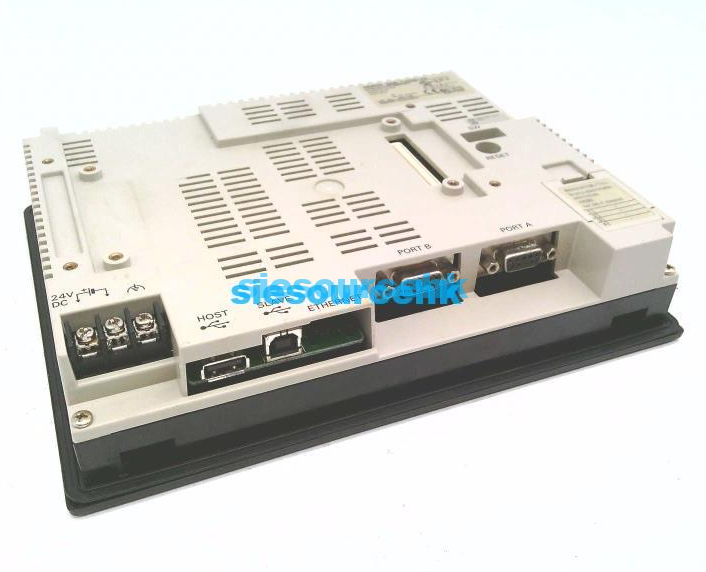
The Omron NS8-TV00B-ECV2 stands as a cornerstone in the evolution of Human-Machine Interfaces (HMI), bridging the gap between legacy serial communication and modern Ethernet-based industrial networking. As part of the established NS8 series, this 8.4-inch color touchscreen is designed for high-reliability environments where precise machine control and data visualization are non-negotiable.
For automation engineers and OEM project managers, the “ECV2” designation isn’t just a part number suffix; it represents a hardware revision optimized for better connectivity and longevity in harsh manufacturing settings. Understanding its integration capabilities is essential for maintaining uptime in complex PLC-driven systems.
Technical Architecture and Display Performance
At the heart of the NS8-TV00B-ECV2 is an 8.4-inch High-Luminance TFT LCD. Unlike standard STN displays found in budget-tier HMIs, the TFT technology in the NS8 series provides a 256-color palette (up to 32,768 colors for images) and a 640 x 480 VGA resolution. This clarity is critical for operators who must monitor high-density data trends or detailed CAD-style machine layouts.
From a hardware durability perspective, the unit is built to withstand the rigors of the factory floor. It features an IP65F front panel rating, ensuring protection against oil mist and water spray—common occurrences in CNC machining and food processing environments. The touch membrane is rated for millions of operations, reducing the “dead spot” syndrome often seen in lower-quality resistive screens after years of heavy use.
The Significance of the ECV2 Revision
When evaluating the NS8 series, the “ECV2” hardware version is a significant upgrade over the original V1 or standard units. The primary advantage is the integrated 10/100Base-T Ethernet port. In the current landscape of Industrial Internet of Things (IIoT) and Industry 4.0, having an HMI that speaks natively to Ethernet/IP and FTP protocols is mandatory.
The ECV2 model allows for:
- Simultaneous PLC Communication: Connect to Omron CJ2, CS1, or NJ/NX controllers via Ethernet while maintaining serial links to legacy peripheral devices like temperature controllers or inverters.
- FTP Server/Client Functionality: Seamlessly transfer recipe data and alarm logs to a centralized server without manual USB extraction.
- Remote Monitoring: Using Omron’s Web Interface tools, engineers can view the HMI screen from a remote PC, significantly reducing troubleshooting time for distributed assets.
Integration Logic: Connecting the NS8 to the Automation Stack
The NS8-TV00B-ECV2 is engineered for deep integration with Omron’s Sysmac architecture. It is programmed using CX-Designer, a component of the CX-One software suite. One of the most significant time-savers for engineers is the “SAP” (Smart Active Parts) library.
Instead of manually creating complex communication code for an inverter or a modular temperature controller, users can drag and drop pre-configured SAP objects onto the screen. These objects come with pre-built logic that automatically links the HMI variables to the device parameters. In high-volume OEM projects, this functionality can reduce HMI development time by as much as 40%.
Comparative Suitability: When to Choose the NS8-TV00B-ECV2
In the procurement phase, buyers often compare the NS8 with the newer NA5 series or the more economical NB series. The NS8-TV00B-ECV2 occupies a strategic “sweet spot” for several reasons:
- Legacy Compatibility: For factories running existing Omron CS/CJ PLC systems, the NS8 offers the most stable and native driver support. It supports “Controller Link” and “NT Link” protocols that newer HMIs might handle only through complex conversion.
- Mounting Footprint: Many control panels are pre-cut for the 8.4-inch NS8 dimensions. Upgrading to an ECV2 model allows for an “instant” hardware refresh without the need for panel modifications or mechanical redesign.
- Advanced Macro Functionality: Unlike the entry-level NB series, the NS series supports complex C-style macros. This allows the HMI to perform localized data processing, reducing the logic load on the main PLC.
Strategic Procurement and Lifecycle Management
As an industry expert, it is important to note that the NS series is a mature product line. While Omron continues to support the NS8-TV00B-ECV2 due to its massive global install base, procurement managers should consider the following:
- Availability: While newer series are often prioritized for new builds, the NS8 remains the gold standard for “drop-in” replacements in existing lines. Suppliers like Siesource specialize in providing these specific models to prevent production downtime.
- Spare Parts Strategy: For critical infrastructure, maintaining a “hot-swap” spare of the NS8-TV00B-ECV2 is recommended. Since the screen data is stored on a standard CompactFlash card (accessible behind the rear cover), recovering from a hardware failure is as simple as moving the CF card to the new unit.
- Compliance: Ensure the unit meets the specific regional certifications required for your project (UL/CSA, CE, or NK for marine applications). The ECV2 generally carries global certifications suitable for export-heavy OEM machinery.
Installation and Maintenance Best Practices
To maximize the lifespan of an Omron HMI in a manufacturing environment, engineers should follow these field-tested protocols:
| Feature | Maintenance Requirement |
| Backlight Management | Utilize the “Screen Saver” function to turn off the backlight during idle periods, extending the CCFL/LED life. |
| Gasket Integrity | Inspect the rear waterproof gasket annually, especially in wash-down environments, to prevent moisture ingress. |
| Battery Replacement | The internal lithium battery maintains the system clock and SRAM data. Replace every 5 years to avoid losing alarm history. |
| Airflow | Ensure at least 50mm of clearance behind the HMI for heat dissipation, particularly if using the Ethernet port at high data rates. |
FAQ
Q1: Can I replace an older NS8-TV00B-V1 with an NS8-TV00B-ECV2?
A: Yes. The ECV2 is backward compatible in terms of mounting dimensions and basic functionality. However, you will need to update your CX-Designer project to recognize the new hardware version to utilize the expanded Ethernet capabilities.
Q2: What is the primary difference between the NS8 and the NB8 series?
A: The NS8 is a high-performance HMI supporting multi-vendor communication, complex macros, and Smart Active Parts. The NB series is a cost-effective alternative designed for simple, standalone applications with limited protocol requirements and less processing power.
Q3: How do I transfer my project from a PC to the NS8-TV00B-ECV2?
A: You can transfer projects via a standard USB cable (Type-B port on the HMI), via the Ethernet port, or by using a CompactFlash (CF) card. Ethernet is generally preferred for remote updates.
Q4: Does this model support non-Omron PLCs?
A: Yes, the NS series supports several third-party drivers, including those for Mitsubishi, Rockwell (Allen-Bradley), and Siemens. However, the deepest integration and the “Smart Active Parts” features are reserved for Omron controllers.
Q5: What should I do if the touchscreen becomes unresponsive?
A: First, try recalibrating the screen through the System Menu (accessed by touching two corners of the screen simultaneously). If the touch points are physically damaged, the glass overlay may need replacement, though most industrial users opt for a full unit swap to ensure IP-rating integrity.
Reference Sources
- Omron Industrial Automation: NS-Series Setup Manual (Cat. No. V083)
- International Electrotechnical Commission: IEC 60529 – Degrees of Protection Provided by Enclosures (IP Code)
- Control Engineering Magazine: Best Practices for HMI Design and Lifecycle Management
- Siesource Product Datasheet: Omron NS8-TV00B-ECV2 Technical Specifications