


Blog
2711P-T7C22D9P PanelView Plus 7 HMI: Specs & Buying Guide

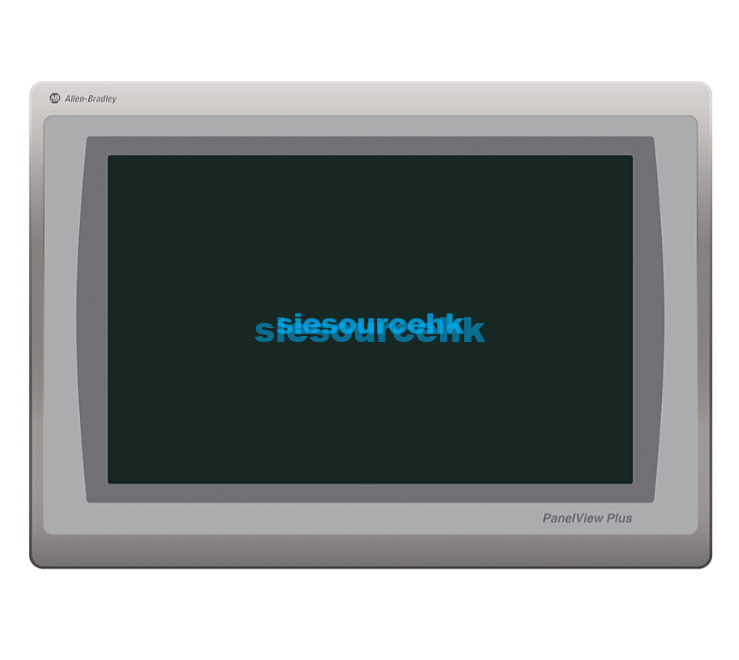
The 2711P-T7C22D9P is an Allen-Bradley PanelView Plus 7 Performance graphic terminal designed for industrial operator-interface applications. It combines a 6.5-inch touch display, VGA TFT color graphics, 24V DC power, and dual Ethernet connectivity with Device Level Ring (DLR) support.
For buyers evaluating this HMI, the important questions are not simply whether the catalog number matches. You also need to verify the terminal series, display requirements, network topology, FactoryTalk compatibility, firmware, and the condition of the unit being supplied.
What is the 2711P-T7C22D9P?
The 2711P-T7C22D9P is a touch-screen PanelView Plus 7 Performance terminal from Rockwell Automation’s Allen-Bradley product family.
According to Rockwell Automation, the model is specified as a 6.5-inch VGA TFT color terminal with 24V DC input and Ethernet DLR capability. Rockwell currently lists the catalog number as an active product.
Key specifications include:
| Specification | 2711P-T7C22D9P |
|---|---|
| Product family | PanelView Plus 7 Performance |
| Input method | Touch screen |
| Display | 6.5-inch VGA TFT color |
| Resolution class | VGA |
| Network | Dual Ethernet |
| Network topology | DLR, linear, star |
| Input power | 24V DC |
| Operating environment | Industrial automation |
| Manufacturer | Rockwell Automation / Allen-Bradley |
| Catalog number | 2711P-T7C22D9P |
Rockwell’s technical documentation identifies the model as a touch-only 6.5-inch terminal and distinguishes it from keypad-and-touch variants in the same family.
An important specification check
Some third-party listings describe PanelView Plus products using inconsistent screen sizes or resolutions. Buyers should therefore verify the exact catalog number against Rockwell documentation rather than selecting a unit from a similar-looking product description.
For this model, the official Rockwell documentation should take priority over marketplace specifications.
Why choose this PanelView Plus 7 Performance terminal?
The main advantage of the Performance platform is its position within Rockwell’s broader operator-interface ecosystem.
PanelView Plus 7 terminals can be developed with FactoryTalk View Machine Edition, while Rockwell also supports remote monitoring through VNC and FactoryTalk ViewPoint on applicable configurations.
This makes the platform suitable when an HMI must do more than display a few basic machine values.
Typical functions include:
- Machine status visualization
- Operator commands
- Alarm and event monitoring
- Production parameter display
- Process-value monitoring
- Recipe or production data interfaces
- Remote HMI access where supported
- Ethernet-based controller communication
- Integration with Rockwell automation architectures
FactoryTalk View Machine Edition is specifically positioned by Rockwell as an HMI application platform for machine-level operator interfaces.
For an existing Allen-Bradley installation, staying within the same software and hardware ecosystem can also reduce engineering changes during replacement or system expansion.
How does the 2711P-T7C22D9P fit an automation system?
The terminal normally sits between the machine operator and the control system.
A simplified architecture looks like this:
Operator → PanelView Plus 7 HMI → Ethernet network → PLC / automation devices
The HMI handles visualization and operator interaction, while the controller remains responsible for the underlying machine logic.
The dual Ethernet design is particularly relevant in systems using Device Level Ring, linear, or star network topologies. Rockwell’s technical documentation specifies two 10/100Base-T Ethernet ports with Auto MDI/MDIX support for the Performance platform.
This can be useful in applications where network architecture matters as much as the display itself.
Common application scenarios
The 2711P-T7C22D9P can be considered for industrial applications such as:
- Packaging machinery
- Material handling systems
- Assembly equipment
- Manufacturing lines
- Process equipment
- Machine-control panels
- Industrial production cells
- OEM automation systems
The right choice depends on the existing controller, communication architecture, enclosure design, software version, and environmental requirements.
A 6.5-inch touch interface can be practical when the machine requires a compact operator station without the physical footprint of a larger 9-, 12-, or 15-inch terminal.
2711P-T7C22D9P vs similar PanelView Plus models
The catalog number matters because visually similar PanelView Plus terminals can have substantially different electrical, display, or input configurations.
| Model characteristic | 2711P-T7C22D9P | Keypad + touch variant | Larger widescreen variant |
|---|---|---|---|
| Operator input | Touch | Touch + keypad | Usually touch |
| Display class | 6.5-inch VGA | 6.5-inch VGA | Larger widescreen |
| Power | 24V DC | Depends on catalog number | Depends on catalog number |
| Ethernet | Dual Ethernet / DLR | Depends on model | Depends on model |
| Physical footprint | Compact | Similar but different front interface | Larger |
| Best fit | Touch-based machine HMI | Applications needing physical keys | More information-dense screens |
The important point is that a similar catalog number does not automatically mean direct interchangeability.
Rockwell’s user documentation separates the touch and keypad/touch catalog numbers, so replacement orders should be checked at the complete catalog-number level.
What should buyers check before ordering?
For a commercial purchase, the catalog number is the starting point rather than the entire specification.
Before ordering a 2711P-T7C22D9P, confirm these items:
- Exact catalog number
Match the complete model number on the quotation, product label, and documentation. - Series and revision
PanelView Plus 7 Performance hardware has evolved across series. Firmware and software compatibility should be checked against the actual terminal supplied. - Display and input type
Confirm that the project requires a 6.5-inch touch interface rather than a keypad or larger display. - Power requirements
The specified input is 24V DC. Rockwell’s technical data gives an operating input range of 18–30V DC for the Performance platform. - Network architecture
If the machine uses DLR, verify the terminal and the rest of the network are configured for the intended topology. - Software compatibility
Check the FactoryTalk View ME version, runtime application, and firmware combination before migration or replacement. - Physical condition
For replacement equipment, inspect the touchscreen, bezel, display, ports, mounting hardware, and product label. - Certification requirements
Do not assume that every PanelView Plus configuration carries exactly the same certification. Verify the markings on the specific unit.
Rockwell currently lists the 2711P-T7C22D9P as active and provides technical documentation, firmware downloads, drawings, and certification information through its product page.
Software and firmware compatibility matters
Replacing an HMI is not always a simple hardware swap.
The existing runtime application may have been created with a particular version of FactoryTalk View ME. The replacement terminal’s firmware and hardware series must support the application configuration.
Rockwell’s compatibility resources are therefore useful when upgrading an existing PanelView installation. The manufacturer maintains compatibility information covering PanelView Plus 7 Performance, FactoryTalk View Machine Edition, and controller combinations.
Firmware history also matters. For example, Rockwell’s current documentation includes firmware packages for PanelView Plus 7 Performance, while recent release notes distinguish Series A and Series B hardware.
A practical replacement workflow is:
Identify catalog number → verify series → check firmware → check FactoryTalk ME compatibility → confirm network configuration → test the runtime application → install
This approach is safer than assuming that two PanelView Plus terminals are interchangeable because they share the same product family.
Where to source 2711P-T7C22D9P for replacement projects
For buyers looking for a 2711P-T7C22D9P in stock, the purchasing priority should be model accuracy and traceability rather than headline price alone.
The product listing from SieSource identifies the unit as an Allen-Bradley operator interface HMI and provides an order/quotation path.
You can review the specific listing here:
2711P-T7C22D9P Allen-Bradley Operator Interface HMI
The supplier page states that in-stock items are normally shipped within five business days after payment, while international delivery may vary because of destination and customs processing. These are supplier-specific commercial terms and should be reconfirmed before placing an order.
For a replacement project, buyers should request confirmation of:
- Exact catalog number
- Series and revision
- New, unused, refurbished, or used condition
- Product label and serial information
- Available quantity
- Firmware status
- Warranty terms
- Shipping origin
- Delivery estimate
- Export packaging
This is especially important when the HMI is being purchased to restore an existing production line.
Is the 2711P-T7C22D9P still a good choice?
Yes, when the existing automation system is already based around the PanelView Plus 7 Performance platform and the application requirements match the terminal.
Its strongest use case is not necessarily a new automation architecture built from scratch. It can be particularly practical for maintenance, replacement, system expansion, and standardization projects where compatibility with an established Rockwell environment is important.
For new projects, engineers should still compare the required screen size, software lifecycle, communication requirements, cybersecurity expectations, and future support before fixing the hardware model.
Rockwell’s current product information lists the 2711P-T7C22D9P as active, but project teams should always verify the exact hardware series and available firmware before committing to a replacement strategy.
FAQ
What is the 2711P-T7C22D9P?
The 2711P-T7C22D9P is an Allen-Bradley PanelView Plus 7 Performance touch-screen graphic terminal with a 6.5-inch VGA TFT color display and 24V DC input.
Is the 2711P-T7C22D9P a touch-screen HMI?
Yes. Rockwell identifies this catalog number as a touch-only operator interface. The related B7 model uses a keypad-and-touch configuration.
What voltage does the 2711P-T7C22D9P use?
The terminal uses 24V DC nominal input. Rockwell’s technical data specifies an 18–30V DC operating range for the Performance terminal platform.
Does the 2711P-T7C22D9P support Ethernet?
Yes. The Performance platform uses two 10/100Base-T Ethernet ports and supports DLR, linear, and star network topologies.
What software is used with the PanelView Plus 7?
Rockwell positions FactoryTalk View Machine Edition as the HMI application platform for PanelView Plus terminals. Compatibility should be checked against the specific hardware series and firmware.
Is 2711P-T7C22D9P the same as a 2.9-inch or 800×480 HMI?
No. Rockwell’s official documentation identifies this catalog number as a 6.5-inch VGA TFT color terminal. Buyers should rely on the exact catalog number and official documentation when specifications conflict across listings.
What should I verify when buying a replacement?
Verify the complete catalog number, hardware series, condition, firmware, FactoryTalk compatibility, network configuration, certification markings, warranty, and delivery terms before purchase.
Reference Sources
- Rockwell Automation – 2711P-T7C22D9P Product Page
Rockwell Automation: 2711P-T7C22D9P
Used for the current product status, catalog number, power information, documentation, firmware and certification details. - Rockwell Automation – PanelView Plus 7 Performance Technical Data
PanelView Plus 7 Performance Technical Data
Used for display, input type, Ethernet, DLR, power and hardware specifications. - Rockwell Automation – PanelView Plus 7 Performance User Manual
PanelView Plus 7 Performance User Manual
Used for catalog-number selection and product configuration information. - Rockwell Automation – PanelView Plus 7 Graphic Terminals
PanelView Plus 7 Graphic Terminals
Used for platform-level networking, software, remote-access and application information. - Rockwell Automation – FactoryTalk View Machine Edition
FactoryTalk View Machine Edition
Used for FactoryTalk View ME functionality and PanelView Plus integration.