


Blog
Siemens Module 6ES7272-0AA30-0YA1: Specs, Applications & B2B Buying Guide

1. Product Overview: What Is 6ES7272-0AA30-0YA1?
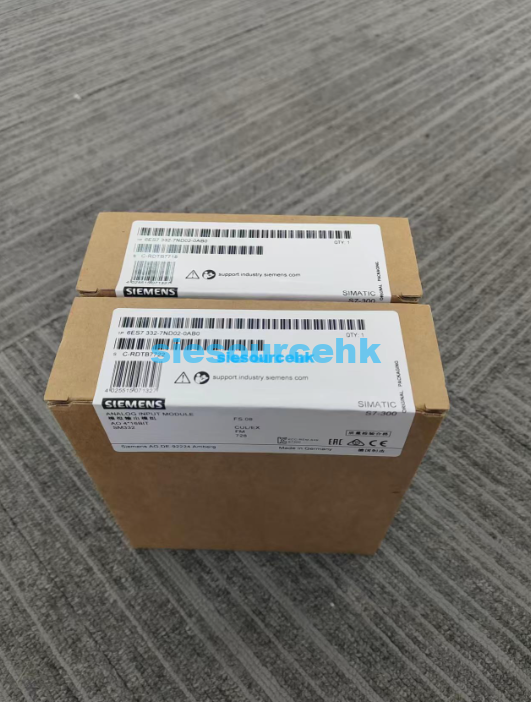
1.1 Product Snapshot
| Attribute | Detail |
| Product Name | Siemens Module 6ES7272-0AA30-0YA1 |
| Manufacturer | Siemens AG (Germany) |
| Product Family | SIMATIC |
| Series | S7-1200 system accessories / module family |
| Country of Origin | Germany (with licensed manufacturing partners across EU and Asia) |
| Primary Function | Industrial automation module designed to extend the S7-1200 compact PLC system with communication, signal processing, or specialized I/O functionality |
| Condition | New |
| MOQ (for B2B procurement) | 1 unit (bulk pricing available on request) |
| List Price | $270.00 USD |
| Current Price | $225.00 USD |
| Product Link | https://siesourcehk.com/product/siemens-module-6es7272-0aa30-0ya1/ |
1.2 Where It Belongs in Siemens’ Automation Stack
Siemens designed the SIMATIC family as a modular automation architecture, not a single product. Each module carries a structured order code (the 6ES7… prefix) that signals which series it belongs to and what role it plays. The 6ES7272-0AA30-0YA1 carries the 272 order-code group — that group covers a specific class of S7-1200 system modules, including communication processors and interface modules that bridge the compact PLC to field devices, networks, or higher-level controllers.
2. Technical Specifications & Order Code Decode
2.1 How to Read the Order Code
Every Siemens order number is a small piece of engineering documentation. Decoding it helps you tell at a glance whether a module fits your project’s voltage, configuration, and approval requirements.
| Code Segment | Identifies | What It Tells You |
6ES7 | SIMATIC family | Confirms this is a Siemens SIMATIC product line item |
272 | Series / module group | S7-1200 system module family |
0AA30 | Function variant | Specific module function and feature set |
0 | Sub-variant | Hardware/configuration break |
YA1 | Approvals / labeling | Region-specific approval bundle (e.g., CE, RCM, KC) |
Expert Tip: When the third segment of a Siemens order code starts with
0A…0Y…, it typically denotes a base-level functional variant without optional add-ons. Engineers comparing 6ES7272-0AA30-0YA1 against higher suffix variants (e.g., 0AA40, 1AB…) should check the Siemens TIA Selection Tool for the exact functional delta.
2.2 General Technical Profile
Below is a consolidated profile based on Siemens’ S7-1200 system module category:
| Specification | Typical Value / Range |
| Compatible Controller | SIMATIC S7-1200 CPUs (all firmware versions supported per Siemens compatibility matrix) |
| Communication Interface | Industrial fieldbus / PROFINET integration (series-dependent) |
| Configuration Software | Siemens TIA Portal (Step 7 Basic V15+) |
| Mounting | DIN-rail (TS 35) or direct panel mount |
| Operating Temperature | 0 °C to +55 °C (horizontal mounting); 0 °C to +45 °C (vertical) |
| Storage Temperature | -40 °C to +70 °C |
| Protection Class | IP20 (for cabinet installation) |
| Approvals | CE, UL, FM, RCM (region-dependent — verify on supplier datasheet) |
| LED Diagnostics | SF (system fault), BF (bus fault), ON (power) indicator LEDs |
| Hot Swapping | Not supported in this module class (system-level confirmation required) |
3. Key Functions & Engineering Features
The 6ES7272-0AA30-0YA1 is designed as a system-level module for the S7-1200 PLC series. Its core capabilities typically fall into the following functional buckets.
3.1 Compact PLC System Extension
The S7-1200 product line is Siemens’ answer to cost-sensitive, space-limited automation projects. Modules in the 272-series extend the base CPU with additional capabilities that the CPU alone cannot deliver — for example:
- Interface bridging between the S7-1200 and external networks
- Expansion of available I/O beyond the CPU’s onboard channels
- Connection to drive systems (e.g., SINAMICS) or distributed I/O (e.g., ET 200)
3.2 TIA Portal Integration & Fast Configuration
All S7-1200 modules are configured inside Siemens’ Totally Integrated Automation (TIA) Portal. From a B2B engineering standpoint, this delivers two practical benefits:
- One engineering environment for PLC, HMI, drive, and SCADA — no separate toolchains
- Drag-and-drop module configuration with auto-detected hardware in most cases
3.3 Industrial-Grade Reliability
Siemens SIMATIC modules are built for 24/7 operation under harsh plant conditions. Features include:
- Conformal-coated PCB options on selected variants
- EMC immunity per IEC 61131-2 industrial standards
- MTBF ratings typically in the 100,000+ hour range
3.4 Diagnostics & Maintenance
The module’s LED status panel (SF, BF, ON) gives instant diagnostic feedback. In larger systems, the diagnostic events are also surfaced to the TIA Portal HMI and SCADA layers, which makes troubleshooting a single PLC cell instead of a plant-wide discovery mission.
4. Where This Module Fits in the SIMATIC Ecosystem
Buyers rarely evaluate a single Siemens module in isolation. They evaluate it against the rest of their control cabinet. Below is the broader Siemens SIMATIC stack this module is part of.
| Product Series | Positioning & Core Strength | Typical Module Types Inside the Series |
| SIMATIC S7-1500 | High-end PLC for medium-to-large automation projects; strong processing power and integrated motion control | Technology modules (high-speed counting, positioning), communication modules, digital and analog I/O |
| SIMATIC S7-1200 | Compact PLC with high cost-performance ratio; ideal for small automation systems | Signal boards, communication modules, digital and analog I/O modules |
| SIMATIC S7-300 / 400 | Legacy, widely deployed PLC systems; mature technology with massive installed base | Function modules (FM), I/O modules |
| SIMATIC ET 200 | Distributed I/O deployed close to the machine; communicates with main PLC over fieldbus (PROFIBUS / PROFINET) | ET 200SP, ET 200MP, ET 200S variants with various I/O and function modules |
| SINAMICS | High-end drive platform — Line Modules, Motor Modules, Control Units for precision motor control and regenerative braking | Active Line Modules (ALM), Basic Line Modules, Smart Line Modules |
| SIRIUS | Industrial control and protection — contactors, relays, pushbutton and indicator systems | SIRIUS ACT, 3RT contactors, 3RU overload relays |
4.1 Compatibility Map
| Pairing | Compatibility | Common Use Case |
| S7-1200 + 272-series module | Native | Standard — direct backplane integration |
| S7-1500 + 272-series module | Not direct — S7-1500 uses different module family | Use S7-1500 equivalent module instead |
| ET 200SP head + 272-series module | Series-dependent | Confirm Siemens TIA Selection Tool compatibility |
| SINAMICS drive + 272-series module | Via PROFINET / PROFIBUS | Drive coordination from S7-1200 master |
5. Industrial Applications & Real-World Use Cases
The 6ES7272-0AA30-0YA1 — within its S7-1200 family context — is suited to projects that need a compact, reliable PLC platform. The five most common deployment scenarios we see in B2B procurement are below.
5.1 Small-to-Mid Manufacturing Lines
S7-1200 systems dominate 5-to-50 axis machine applications. The 272-series modules add the connection points these machines need for sensors, drives, and safety circuits.
5.2 Building Automation
HVAC, lighting control, and energy management in mid-sized commercial buildings often run on S7-1200s with modular expansions for additional protocols or I/O.
5.3 Water and Wastewater Treatment
Pump control, level monitoring, and chemical dosing are common S7-1200 use cases — particularly in smaller municipal plants where lifecycle cost matters more than ultra-high processing power.
5.4 Material Handling and Packaging
Conveyor sortation, palletizing, and packaging machines pair the S7-1200 with distributed I/O (ET 200) and SINAMICS drives — and modules in the 272 series often serve as the bridging interface.
5.5 OEM Machine Building
Original Equipment Manufacturers (OEMs) building machines for global export value the S7-1200 platform’s worldwide certification footprint and Siemens’ global support network.
6. 6ES7272-0AA30-0YA1 vs Similar Siemens Modules
If you’re evaluating the 6ES7272-0AA30-0YA1 for your project, the comparison below is a starting point. Always cross-check the exact order code suffix against the latest Siemens catalog.
| Module | Series | Best For | Approx. Positioning vs 6ES7272-0AA30-0YA1 |
| 6ES7272-0AA30-0YA1 | S7-1200 module | Standard compact PLC expansion | Reference baseline |
| 6ES7232-4HD32-0YB0 | S7-1200 analog output SM | Adding analog output channels | Different function — analog SM not direct substitute |
| 6ES7231-5PD32-0XB0 | S7-1200 analog input SM | Adding analog input channels | Different function — analog SM not direct substitute |
| 6GK7243-5FX30-0XE0 | S7-1200 CP 1243-7 | Cellular / remote telemetry | Communication vs measurement — adjacent, not identical |
| 6ES7138-4DB03-0AB0 | ET 200S 1SSI absolute encoder module | SSI encoder interfacing on distributed I/O | Different platform — for ET 200S not S7-1200 |
| 3SU1400-1LK10-3BA1 | SIRIUS ACT interface module | PROFINET for pushbutton and indicator systems | Entirely different product family — control and protection |
| 6SL3130-7TE25-5AA3 | SINAMICS S120 Active Line Module | Regenerative drive line module | Different family — drives not control |
6.1 Decision Rule for Buyers
- Choose 6ES7272-0AA30-0YA1 when you need to extend an S7-1200 control system with the function defined by this module’s variant family.
- Choose an S7-1500 equivalent when the application demands higher cycle times, larger program memory, or integrated motion control — but understand you’re moving into a different cost bracket.
- Choose an ET 200 distributed I/O module when you need to push I/O closer to the field devices, not just expand the central controller.
7. Installation and Configuration Best Practices
These best practices are written for the S7-1200 system module class generally — not for one specific variant — and reflect how our engineering team commissions this category of Siemens modules.
7.1 Cabinet Design Considerations
- Maintain a minimum clearance of 25 mm above and below for airflow.
- Keep analog signal wiring separated from power cables by at least 200 mm or use shielded cable trays.
- Ensure cabinet temperature does not exceed the 55 °C horizontal / 45 °C vertical rating.
- Use Siemens SIMATIC TOP cable harnesses where possible — they reduce wiring errors and improve serviceability.
7.2 TIA Portal Configuration Workflow
- Add the module to your project hardware catalog (TIA Portal auto-imports Siemens devices).
- Configure channels in the device view (addresses, diagnostics, interrupts).
- Add the module to your program tree and reference its I/O symbols.
- Download the hardware configuration to the S7-1200 CPU.
- Validate online using the “Online & Diagnostics” panel.
7.3 Common Pitfalls to Avoid
- Assuming the module is hot-swappable — most S7-1200 modules are not.
- Mixing firmware versions in the same project without checking Siemens’ compatibility matrix.
- Routing PROFIBUS or PROFINET cables parallel to VFD power cables without shielded conduit.
- Skipping EMC grounding — IEC 61131-2 compliance requires a clean ground reference.
8. Pricing Breakdown & B2B Buying Guidance
8.1 Price Reference
| Item | Value |
| Original Price | $270.00 USD |
| Current Price | $225.00 USD |
| Effective Discount | ~16.7% |
| Availability | Confirm with supplier — modules in this class are frequently stocked but lead times vary by region |
8.2 What Drives the Final B2B Price?
| Cost Driver | Impact |
| Quantity break | Tier-1 distributors typically offer 5–15% additional discount at 10+ units |
| Lead time | Stock items vs. factory orders carry materially different pricing |
| Country of origin | EU-sourced vs. Asia-licensed-manufacturing can vary by 10–20% |
| Authorization | Authorized Siemens Channel Partners offer traceable warranty; gray market may not |
| Logistics | DHL/UPS for small quantities vs. sea freight for bulk |
8.3 B2B Buying Checklist
- Confirm the exact order code matches what you specified in the bill of materials.
- Request a Certificate of Conformity (CoC) and traceability document from the supplier.
- Verify warranty terms — Siemens authorized channels typically provide 12-month standard warranty.
- Ask about firmware status if the project requires a specific version.
- For B2B purchasing, request a pro-forma invoice before payment to lock pricing.
9. Pros & Cons: A Procurement Engineer’s Honest Take
9.1 Strengths
- Compact form factor — fits in small cabinets and OEM machine frames.
- Global Siemens support network — service is available in most industrial markets.
- TIA Portal ecosystem — one engineering environment reduces training overhead.
- Mature technology — S7-1200 platform has been deployed since 2009 with continuous firmware evolution.
- Strong documentation — Siemens provides application examples, function blocks, and FAQs.
9.2 Limitations
- Limited for high-end motion control — for complex multi-axis motion, step up to S7-1500.
- IP20 only — not suited for outdoor or washdown environments without additional enclosure.
- Region-specific approvals — verify the suffix (e.g.,
0YA1) is right for your deployment country. - Single CPU dependency — if the host CPU fails, the module ceases to function (no autonomous mode).
10. Frequently Asked Questions (FAQ)
10.1 What is the Siemens 6ES7272-0AA30-0YA1 module used for?
The 6ES7272-0AA30-0YA1 is a SIMATIC-series module designed for use with the Siemens S7-1200 compact PLC family. It is typically deployed to expand the S7-1200’s capabilities — adding communication, signal interface, or specialized functions that the base CPU does not natively provide. Specific function depends on the module’s variant details in the Siemens catalog.
10.2 Is the 6ES7272-0AA30-0YA1 compatible with S7-1500?
No — not directly. The S7-1500 PLC family uses a different module family (152-series SM/CP/AI/AO modules). For an S7-1500 system, choose the equivalent module from the S7-1500 catalog instead. Cross-family pin-compatibility is not supported by Siemens.
10.3 What software is required to configure the 6ES7272-0AA30-0YA1?
Siemens TIA Portal (Step 7 Basic V15 or later, plus any installed HSPs for that firmware version) is the standard configuration environment. TIA Portal handles hardware detection, parameterization, and program download to the S7-1200 CPU and its connected modules.
10.4 What is the difference between SIMATIC S7-1500 and S7-1200?
- S7-1500 is Siemens’ high-performance PLC line for medium-to-large automation projects, with integrated motion control, larger memory, and more advanced diagnostics.
- S7-1200 is the compact, cost-effective line for small automation projects, expandable via signal boards and communication modules.
10.5 What is the difference between SIMATIC and SINAMICS?
- SIMATIC is Siemens’ automation and control product family (PLCs, HMIs, I/O, distributed I/O).
- SINAMICS is Siemens’ drive family (frequency converters, motor modules, line modules for precise motor control).
The two work together in many applications — SIMATIC controls, SINAMICS drives.
10.6 Where can I buy the 6ES7272-0AA30-0YA1 with warranty?
Buy from authorized Siemens distribution partners whenever possible to ensure traceability and warranty coverage. For B2B procurement, the product page at https://siesourcehk.com/product/siemens-module-6es7272-0aa30-0ya1/ is one option for indicative pricing and stock checking.
10.7 How do I verify the authenticity of a Siemens module?
- Cross-check the order number against Siemens’ official catalog or support database.
- Request a Certificate of Conformity (CoC).
- Inspect Siemens anti-counterfeit packaging features (QR code, hologram, serialized label).
- Buy from authorized Siemens Channel Partners.
11. Final Verdict & Next Steps
11.1 Who Should Buy This Module?
- System integrators designing S7-1200-based compact automation cells
- OEMs building machines for global export requiring worldwide certification
- Plant engineers expanding existing S7-1200 installations with additional functionality
- Procurement teams sourcing factory-direct or authorized-channel Siemens components
11.2 Who Should Look Elsewhere?
- Projects requiring high-performance motion control — consider S7-1500 instead
- Distributed field I/O needs — consider ET 200SP / ET 200MP instead
- Drive-centric applications — consider SINAMICS family modules