


Blog
6AV2124-0MC01-0AX0 Siemens HMI Touch Panel | TP1200 Specifications & Guide

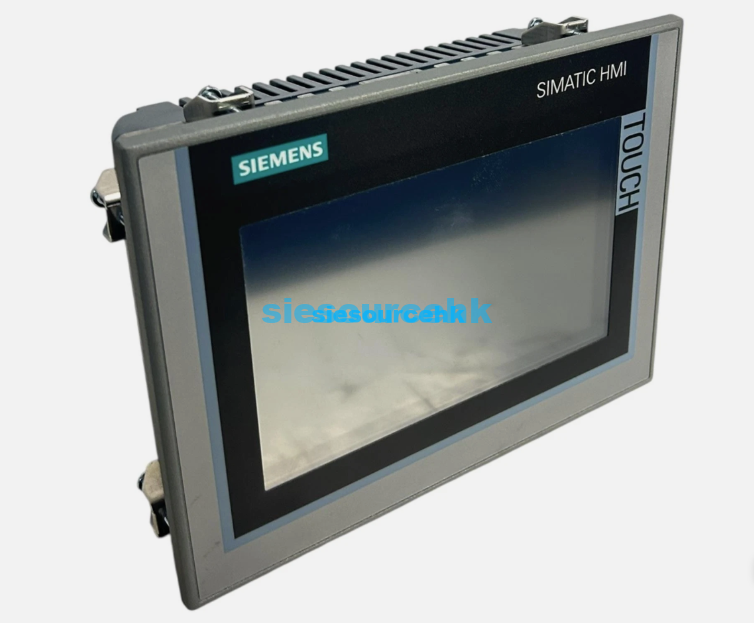
The Siemens HMI Touch Panel 6AV2124-0MC01-0AX0 is a 12.1-inch operator panel designed for industrial machine operation, process monitoring and visualization. As part of the Siemens TP1200 HMI range, it provides a larger display area than compact 4-inch or 7-inch panels, making it suitable for applications where operators need to view more process information on a single screen.
For automation engineers and industrial equipment buyers, selecting a Siemens HMI involves more than screen size. Configuration software, communication interfaces, display resolution, installation environment and compatibility with the existing automation system should also be considered.
This guide explains the key characteristics of the 6AV2124-0MC01-0AX0, how it compares with other Siemens HMI panel types, and what buyers should check before purchasing.
What Is the Siemens HMI Touch Panel 6AV2124-0MC01-0AX0?
The 6AV2124-0MC01-0AX0 is a Siemens TP1200 touch panel with a 12.1-inch display and 1280 × 800 resolution. It belongs to the Siemens SIMATIC HMI family and is designed to provide a graphical operator interface for industrial automation systems.
Unlike key-operated HMI panels, the TP1200 uses a touchscreen interface. Operators can use graphical buttons, menus, status indicators, trend displays and other visualization elements to interact with machines and production processes.
The larger 12.1-inch screen can be useful when an HMI application contains multiple process parameters, alarm information, production data or machine controls that would be difficult to display comfortably on a smaller panel.
For product-specific specifications and purchasing information, see the Siemens HMI Touch Panel 6AV2124-0MC01-0AX0 product page.
Siemens TP1200 HMI Main Specifications
The following specifications are commonly used to identify the 6AV2124-0MC01-0AX0 during equipment selection and procurement:
| Specification | 6AV2124-0MC01-0AX0 |
|---|---|
| HMI Type | Touch Panel |
| Product Series | Siemens TP1200 |
| Screen Size | 12.1 inches |
| Display Resolution | 1280 × 800 |
| Display Type | TFT color display |
| Operation | Touchscreen |
| Power Supply | 24 V DC |
| Housing | Aluminum housing |
| Ethernet | Supports Ethernet communication |
| Application | Industrial machine and process visualization |
| Configuration | TIA Portal for applicable generation |
The exact hardware and software compatibility should always be checked against the order number, automation platform and project requirements before procurement.
Key Features of the Siemens TP1200
1. 12.1-Inch Widescreen Display
One of the main advantages of the TP1200 is its larger 12.1-inch display.
A larger HMI screen gives engineers more space to organize the operator interface. For example, a machine control screen can combine:
- Machine status
- Operating parameters
- Alarm information
- Production counters
- Temperature or pressure values
- Trend charts
- Start and stop controls
- Maintenance information
This can reduce the need to switch between multiple screens when monitoring a relatively complex machine.
2. 1280 × 800 Resolution
The 1280 × 800 resolution provides more display space than many compact HMI panels.
For applications involving detailed process graphics, equipment diagrams or multiple data fields, resolution is an important selection factor. However, resolution should not be evaluated independently. The actual suitability of the panel also depends on the HMI project design, font sizes, graphics and the amount of information operators need to view simultaneously.
3. Touchscreen Operation
The TP1200 uses touchscreen operation rather than a dedicated mechanical keypad.
This allows machine builders to create customized operator interfaces for different applications. Screen layouts can include graphical controls, numerical input fields, alarm lists, navigation buttons and other HMI objects.
Touch operation is particularly useful when the machine requires a flexible interface that may change according to operating mode or production requirements.
4. Ethernet and Industrial Communication
Industrial HMI applications normally need reliable communication with PLCs and other automation components.
Depending on the specific system configuration, Siemens HMI panels can be integrated into industrial Ethernet and automation networks. The TP1200 can therefore be used as part of a larger control architecture rather than operating as an isolated display.
Before purchasing, buyers should verify the communication interfaces and protocols required by the PLC and other equipment in the project.
Siemens TP1200 vs Other Siemens HMI Panels
Siemens SIMATIC HMI panels cover different operating methods and screen sizes. The right choice depends on the machine architecture and operator requirements.
TP400 Basic
The TP400 Basic is a compact touch panel intended for applications where the HMI requires a relatively small display and a basic operator interface.
It can be considered for compact machines where screen space and project complexity are limited.
TP700
The TP700 provides a 7-inch display and is positioned between compact panels and larger operator panels.
It may be suitable when the machine requires more visualization space than a small HMI but does not require a 12.1-inch screen.
TP900
The TP900 uses a 9-inch display and offers an intermediate screen size for applications requiring additional visualization space.
It can be a practical option for machines where a 7-inch panel is relatively small but a 12.1-inch panel is unnecessary.
TP1200
The Siemens TP1200, represented by the 6AV2124-0MC01-0AX0 in this article, provides a 12.1-inch display.
It is better suited to applications where operators need to view multiple process parameters, graphics or controls on one interface.
The choice between TP700, TP900 and TP1200 should therefore be based on the amount of information that needs to be displayed rather than simply choosing the largest available screen.
Touch Panel vs Key Panel: Which Siemens HMI Is Better?
Siemens HMI products can also be divided by operating method.
Touch Panels (TP) use touchscreen operation and are suitable for graphical visualization and flexible interface design.
Key Panels (KP) use mechanical or short-stroke keys and can be useful when operators require tactile feedback during machine operation.
For example, an operator working in an environment where it is important to physically feel each key press may prefer a key panel. On the other hand, a machine requiring complex menus, parameter entry, trend displays and graphical process visualization may benefit from a touch panel.
Therefore, the question is not simply which type is better. The appropriate HMI depends on the operating environment, interface requirements and machine control strategy.
Configuration Software for Siemens HMI Panels
Configuration software is an important consideration when replacing or purchasing a Siemens HMI.
Newer generations of Siemens SIMATIC HMI panels are generally integrated into the TIA Portal engineering environment. This allows HMI projects to be developed alongside PLC and other automation components within the same engineering ecosystem where supported.
Older Siemens HMI products may use WinCC flexible or other legacy configuration software.
This distinction is particularly important when replacing an existing HMI. A physically compatible panel does not necessarily mean that an existing project can be transferred directly to the replacement device.
Before ordering a Siemens HMI, buyers should confirm:
- Existing HMI model and order number
- Current configuration software
- WinCC or TIA Portal version
- PLC model
- Communication protocol
- Existing HMI project format
- Required screen size and resolution
- Installation dimensions
Common Applications of Siemens TP1200 HMI
The Siemens TP1200 can be used in a variety of industrial automation applications where operators need a relatively large graphical interface.
Typical applications include:
Machine Automation
Machine builders can use an HMI to display operating parameters, machine status, alarms and manual controls.
Production Lines
A larger display can help operators monitor multiple production stages and view process information from a central interface.
Process Monitoring
Applications involving temperature, pressure, flow, speed or other process variables can use graphical HMI screens to present operating information.
Equipment Commissioning
During commissioning and maintenance, engineers may need access to a larger number of parameters and diagnostic screens. A larger HMI can make these functions easier to organize.
Control Cabinets and Operator Stations
The TP1200 can also be integrated into industrial control cabinets or operator stations where a larger display is preferred.
What Should You Check Before Buying a Siemens HMI Touch Panel?
If you are purchasing a Siemens HMI for a new machine or replacing an existing panel, consider the following points.
1. Confirm the Complete Order Number
Siemens products can have very similar model names but different order numbers and specifications.
For this reason, procurement teams should verify the complete order number, such as 6AV2124-0MC01-0AX0, rather than relying only on the product family name.
2. Check Screen Size and Resolution
Choose the screen based on the amount of information operators need to see.
A 12.1-inch display can be more appropriate for complex visualization than a compact 4-inch or 7-inch panel, but a smaller panel may be more economical for simple machines.
3. Check Communication Requirements
Confirm that the HMI can communicate with the PLC and other automation devices used in the project.
Network topology, Ethernet ports and supported communication protocols should be reviewed before installation.
4. Check Engineering Software Compatibility
This is especially important for replacement projects.
If the existing system uses an older Siemens HMI platform, determine whether the existing project requires migration or conversion before purchasing a newer panel.
5. Check Mechanical Installation Requirements
The panel must fit the existing cabinet or operator station.
Check the required panel cutout, mounting method, dimensions and installation conditions before replacing an existing HMI.
6. Consider Product Lifecycle
Some older Siemens HMI products are no longer the preferred choice for new automation projects.
If purchasing a replacement for an existing machine, buyers should distinguish between a current-generation product and a legacy product that may require specialized sourcing.
Siemens HMI Touch Panel FAQ
What is Siemens 6AV2124-0MC01-0AX0?
The 6AV2124-0MC01-0AX0 is a Siemens SIMATIC HMI touch panel associated with the TP1200 range. It features a 12.1-inch display with 1280 × 800 resolution and is designed for industrial operator control and process visualization.
What size is the Siemens TP1200?
The Siemens TP1200 uses a 12.1-inch display. This larger screen is intended for applications where operators need to view more process information than can comfortably fit on smaller HMI panels.
Is the TP1200 a touchscreen HMI?
Yes. The TP1200 is a touch-operated HMI, allowing operators to interact with graphical controls, parameter fields, alarms and visualization screens directly through the display.
What software is used to configure Siemens TP1200?
The applicable configuration software depends on the exact product generation and order number. Newer Siemens HMI generations are generally configured through TIA Portal, while older HMI products may use WinCC flexible.
How do I identify a Siemens HMI replacement?
The safest approach is to check the complete Siemens order number on the existing panel. Screen size and product family alone may not provide enough information to identify a compatible replacement.
Conclusion
The Siemens HMI Touch Panel 6AV2124-0MC01-0AX0 is a 12.1-inch TP1200 HMI designed for industrial operator interfaces, machine control and process visualization. Its larger display and 1280 × 800 resolution make it suitable for applications where operators need to monitor multiple parameters or interact with more detailed graphical interfaces.
When selecting a Siemens HMI, buyers should look beyond the screen size. The complete order number, communication interfaces, engineering software, installation requirements, PLC compatibility and product lifecycle should all be evaluated before placing an order.
For procurement teams replacing an existing Siemens HMI, providing the complete order number is one of the most useful ways to identify the required product and avoid compatibility problems.